RankPulse Blog
The 'Real Traffic' Myth: Spotting Inflated Guest Post

You Got Pitched a "100K Monthly Visitors" Guest Post Site. Here's Why You Shouldn't Believe It.
A seller sends you a screenshot. Two thousand monthly visitors in Google Analytics. Bold claim, clean chart. You're ready to say yes, then something feels off. The site's domain authority is 28. Its content reads thin. Nobody's citing it. And somehow they're charging $500 for a post when the traffic doesn't match the price.
You've seen this before. Maybe you've already paid for it.
The problem isn't that traffic numbers are hard to verify. Most guest post sellers inflate them, and the tools people use to check are either gamed or incomplete. I've tracked a curated placement inventory built from thousands of reviewed publisher records. The gap between what sellers claim and what their analytics actually show is so wide it's become the single biggest red flag in the space.
- Most traffic claims are inflated because sellers misread analytics, cherry-pick timeframes, or count bot traffic as real visitors.
- Screenshots and seller promises mean almost nothing. You need independent verification from third-party tools plus behavioral signals.
- A site with 10K real, engaged monthly visitors beats a site with 100K bot clicks. Quality matters more than raw numbers.
- Demand access to analytics directly, check organic keyword rankings, and review engagement metrics before paying anything.
Source note: For Google policy or update references, this article uses Google documentation and treats unsupported update-target claims as audit guidance, not confirmed targeting.
Why Sellers Push Traffic Numbers (And Why They're Often Wrong)
Traffic is the easiest metric to claim and the hardest to disprove in a sales call. A seller doesn't have to prove where their numbers come from. They just show you a screenshot, and most buyers don't dig deeper.
Here's what I see most often:
- Misreading or doctoring Google Analytics. A seller takes a screenshot of total pageviews, not unique visitors. Or they grab a spike from one good month and present it as the norm. Sometimes they include traffic from internal pages that have nothing to do with your niche.
- Using outdated data. A site ranked well in 2021. The seller still quotes those traffic numbers in 2025, even though the site's organic visibility has tanked.
- Confusing potential with actual. Google Search Console shows "impressions" (times a page appears in search results). A seller tells you that's traffic. It isn't. Clicks are traffic. Impressions are not.
- Counting bot traffic as visitors. Not all traffic is human. A site can get hammered by referral bots, automated crawlers, or low-quality ad networks that pump up session counts but deliver zero value to your link.
None of this is accidental. Sellers know traffic is your main decision point, so they optimize for the number, not for honesty.
How to Check Traffic Without Trusting the Seller's Word
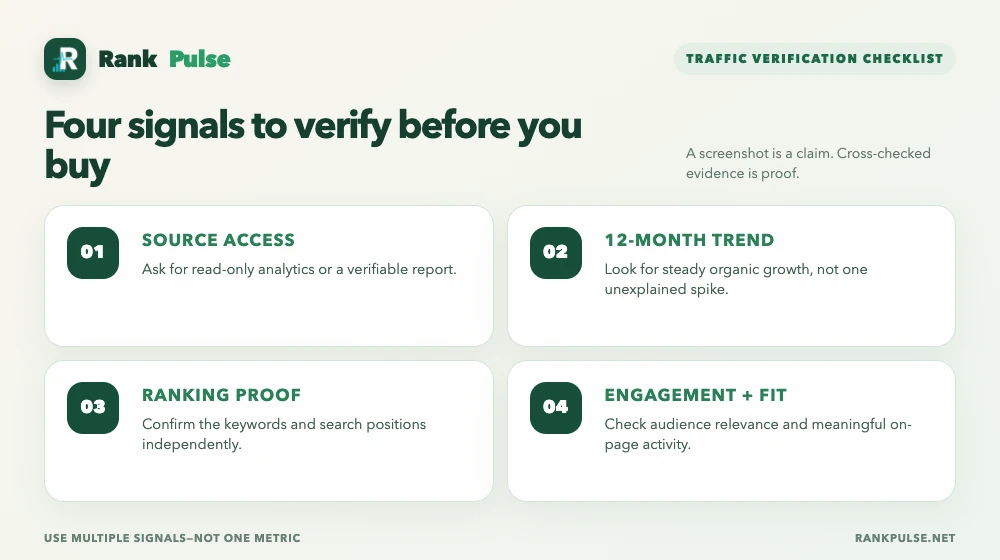
You need at least three independent signals before you pay. Don't rely on one tool or one screenshot.
Step 1: Ask for Direct Analytics Access
If a seller won't share their Google Analytics dashboard in read-only view, walk away. Legitimate publishers with real traffic have nothing to hide. A seller who says "I don't share my analytics" is telling you something. Usually it's "my numbers don't hold up."
If they do share access, look for:
- Consistent organic traffic month over month, not random spikes.
- A bounce rate below 60% (higher means visitors aren't reading).
- Average session duration above 30 seconds (bots usually click and disappear).
- Traffic sources: the bulk should come from organic search, not mystery referral sources.
Step 2: Cross-Check with Third-Party Tools
Ahrefs, SEMrush, SimilarWeb, and Moz all estimate traffic independently. None of them are perfect, but they're harder to fake than a screenshot.
Here's what to look for:
- Consistency across tools. If Ahrefs says 5K monthly visitors and SimilarWeb says 50K, something's wrong. Real traffic shows a narrower range across estimators.
- Organic search dominance. Check if the tool breaks down traffic by source. Legit sites get most traffic from Google. If the tool shows strong social or direct traffic but weak organic, the site isn't ranking for valuable keywords.
- Keyword rankings. Use Ahrefs or SEMrush to pull the site's top ranking keywords. Search for them on Google. Can you actually find the site in the top 10? If not, the traffic numbers are fiction.
A seller claims sitedomain.com gets 123K monthly visitors. Ahrefs shows DR 73, organic traffic aligns with third-party estimates, and top keywords actually rank. The claim checks out. A site that says 100K visitors but doesn't rank for a single keyword over 100 searches per month? That's the red flag.
Step 3: Analyze Engagement and Content Quality
High traffic from a low-quality site doesn't help your link. The visitor won't stay long, won't trust the content, and won't click through to you.
Spend five minutes reading the site:
- Are articles 1,500+ words with proper sourcing, or thin 300-word filler?
- Do they update content, or is everything from 2021?
- Is there an author byline and bio, or is it anonymous?
- Do other sites link to their content, or are they an island?
If the site feels cheap, its traffic probably is too. Real publishers attract real readers because the writing is good.
What "Real Traffic" Actually Means for Your Link
You're not paying for traffic volume. You're paying for authority transfer.
A link from a site with 10,000 real monthly visitors who actively read and share content will move rankings better than a link from a site with 100,000 bot clicks. Google's systems notice which links come from engaged audiences.
Traffic that sticks around, reads, and acts human is a proxy for trustworthiness. Traffic that bounces in two seconds is a red flag.
This is why we focus on niche relevance, not raw visitor count. A link on an ecommerce site that gets 20K monthly visitors from people shopping for running shoes is worth far more than a link on a generic news site with 500K traffic that includes everyone.
When you vet a guest post opportunity, prioritize:
- Audience overlap with your niche.
- Engagement depth, not visitor volume.
- Organic growth trajectory, not sudden spikes.
- Editorial quality, not just page design.
Red Flags That Should Trigger Immediate Skepticism
If a seller says any of these, assume the traffic numbers are wrong:
- "I don't have Google Analytics access" or "I've never tracked my traffic" (legitimate publishers track everything).
- "The traffic jumped 300% last month but I can't explain why" (real growth is earned slowly).
- "Third-party tools underestimate my traffic by 10x" (they don't).
- "I'll give you a screenshot but not access" (why?).
- "The site's traffic is hard to measure" (it isn't, if you have proper tracking).
- The site ranks for zero keywords you can verify in the top 50 (phantom traffic).
What Vetted Inventory Looks Like in Numbers
Across a 550-site sample of our vetted inventory, here's what transparent metrics look like:
| Metric | 550-Site Sample |
|---|---|
| Median Domain Authority (Moz) | 49 |
| Median Domain Rating (Ahrefs) | 63 |
| Sites with DR 70+ | 37% |
These are sites we've personally verified. We run organic checks, traffic audits, and niche-fit reviews before listing them. Not all are high-traffic sites. Some get 5K monthly visitors. Others get 80K. But every one passes the engagement test, ranks for real keywords, and has transparent ownership.
Guest post pricing in our vetted network ranges from $30 to $1,520, with a median of $60. Why the range? A site with 2K monthly visitors and high niche relevance is worth less than a site with 80K visitors and lower relevance. Raw traffic doesn't determine value. Context does.
Questions to Ask a Seller (Before You See a Screenshot)
Ask these in this order. The answers will tell you everything:
- "Can I access your Google Analytics dashboard in read-only mode?" If they hesitate, you have your answer.
- "What's your traffic trend over the last 12 months?" Look for steady growth, not a spike-and-crash pattern.
- "What are your top five organic search keywords that drive traffic?" Then verify them on Google. Can you find the site ranking?
- "What's your average page bounce rate?" Below 60% is healthy. Above 70% means most visitors leave without reading.
- "Who are your typical readers, and how much time do they spend on average per session?" If they can't answer this, they don't actually know their audience.
Most sellers will dodge questions 1, 2, and 5. That's when you know the traffic claim isn't solid.
FAQ: Clearing the Confusion Around Guest Post Traffic
What's the best tool for checking website traffic?
There's no single best tool, which is why you need at least two. Ahrefs and SEMrush are industry standards for SEO pros and give you keyword rankings plus traffic estimates. SimilarWeb breaks down traffic by source (organic, direct, social). Ask for direct Google Analytics access first, then cross-check with one of the paid tools. Never trust a screenshot alone.
How much traffic does a "good" guest post site actually need?
There's no magic number. A site with 3,000 engaged monthly visitors in your exact niche beats a site with 50,000 random visitors from every corner of the internet. If a site gets less than 1,000 monthly visitors and the analytics show high bounce rate, it's probably not worth your money. Aim for at least 2,000 verified organic monthly visitors, but only if the audience is relevant to what you sell.
Can a site with low traffic still be valuable for a guest post?
Yes, if it ranks well for keywords that matter to you and has an engaged audience. A niche blog that gets 800 monthly visitors but ranks on page one for a keyword with 500 monthly searches can be worth more than a high-traffic site that doesn't rank for anything your customers search for. Check the site's keyword rankings and relevance first. Traffic volume is secondary.
What should I do if a seller refuses to provide traffic data or analytics access?
Don't buy. A seller who won't share analytics is hiding something. Either their traffic is lower than claimed, or it comes from bot networks and paid spam sources. Legitimate publishers with real traffic are happy to prove it. If they won't, move to the next opportunity.
Can Google Analytics itself be manipulated to show fake traffic?
Not easily, but a seller can set up tracking code to count bots or irrelevant traffic. The best defense is to cross-check with third-party tools like Ahrefs, which use their own data collection and can't be gamed by the site owner. If Google Analytics shows 50K visitors but Ahrefs shows 5K, something's wrong with how the analytics are configured.
What's the relationship between traffic and link value for SEO?
Traffic is a signal that a site is trustworthy and visited by real people, but it's not a direct ranking factor. What matters is the authority of the linking domain, the relevance of the content, and whether the link sits in an editorial context where readers might actually click it. A low-traffic site with high domain authority and good keyword rankings can deliver more SEO value than a high-traffic site with weak authority. Don't optimize for traffic alone.
How do I know if traffic is organic or bought?
Check the traffic source breakdown in Google Analytics or a third-party tool. Organic traffic should come from Google Search. Bot or paid traffic shows up as referral traffic from unknown sources, direct traffic spikes without explanation, or sudden visitor surges that drop off just as fast. Real organic traffic grows steadily over months, not in one spike.
You've been pitched bad traffic before. You know what it looks like. This framework is meant to give you permission to trust that instinct and back it up with data. Ask for analytics access. Check the keywords. Look at bounce rates. If any of it doesn't add up, the traffic isn't real.
Data note: Our metrics are drawn from our tracking of a curated placement inventory, built from thousands of publisher records reviewed.
If you'd like to see how we vet sites, check out our guest posting service or our current pricing. Every site we list passes the traffic check, and we publish the metrics so you can verify them yourself.
RankPulse sells placements on vetted publisher sites. Consistent with Google's policies, all paid links that pass ranking credit are marked with rel="sponsored" or rel="nofollow" where appropriate to prevent them from being considered spam.
Questions? Reach out to zahid@rankpulse.net. I'll pull the analytics for you.

Level 2 Fiverr seller with a 5.0 rating. Has reviewed thousands of publisher records to build a curated placement inventory since 2024. Fiverr profile · zahid@rankpulse.net