- Pull link data from Google and Bing consoles.
- Spot bad links by checking spam text, dead sites, and link farms.
- Avoid panic disavows to protect good links.
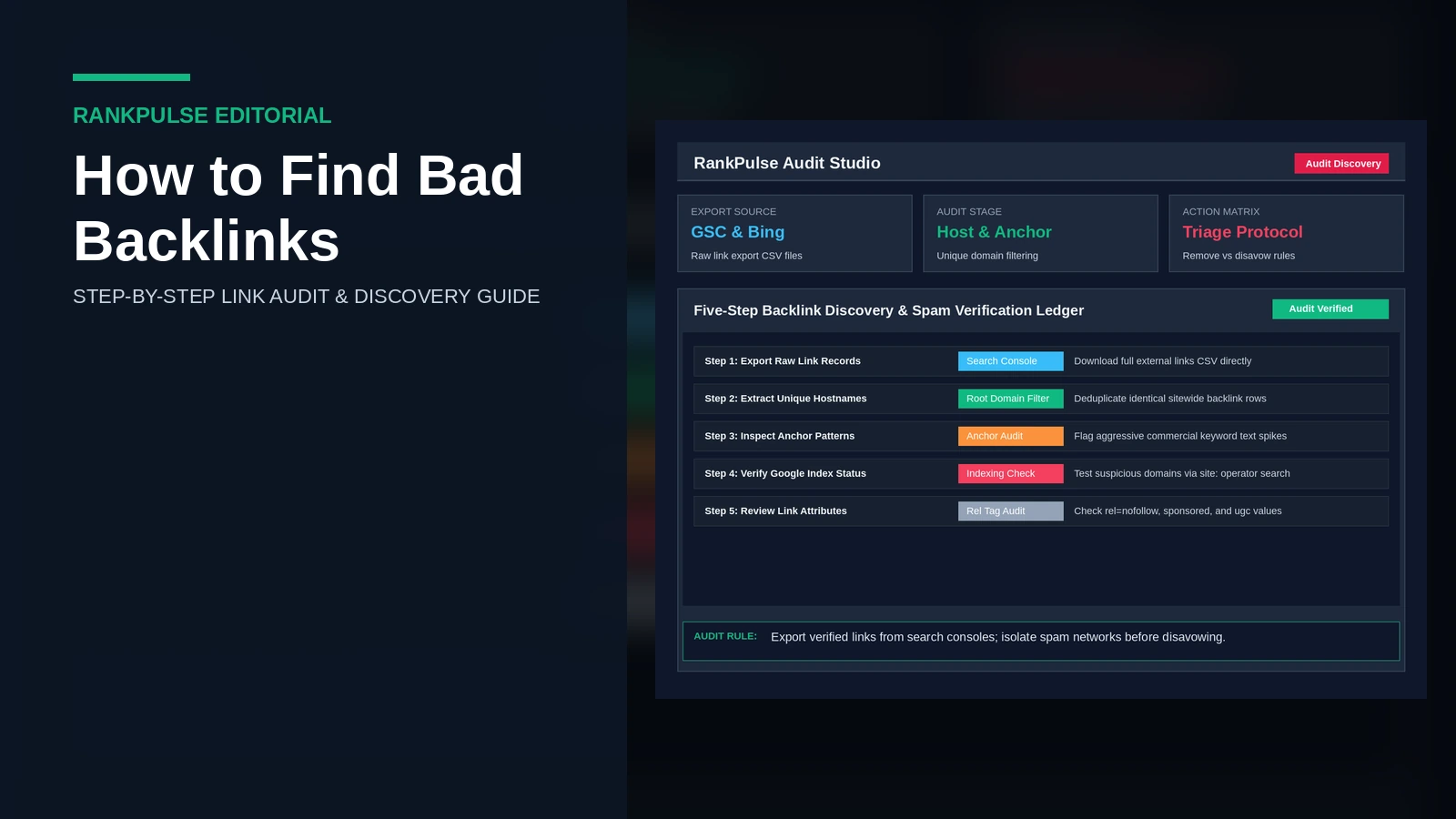
To find bad backlinks, export your live link inventory from Google Search Console and Bing Webmaster Tools. Check each domain against known spam footprints like link farms, casino terms, and dead pages. A regular backlink audit protects your site from search penalties. It helps small marketing teams and agency founders keep clean link profiles. Clean profiles win higher rankings.
Five-step workflow to find bad backlinks
Finding toxic links takes a clear plan. Do not guess. Follow this structured five-step workflow to audit your inbound link profile.
Step 1: Export raw link data from search consoles
Do not depend on third-party spam scores. Start with the search tools that actually evaluate your pages.
Open Google Search Console. Go to the Links report in the left menu. Click the Export button at the top right of the Links report and choose CSV or Google Sheets to download your full external links list. Then open Bing Webmaster Tools. Open Backlinks. Download your full link list from Bing as well. Review our guide on how to check backlinks in Google Search Console for specific export filtering steps.
Step 2: Consolidate records and extract root domains
Open your exported backlink files in Google Sheets. Combine both files into one master sheet. Merge the rows carefully.
Use a spreadsheet formula like =REGEXEXTRACT(A2, "^https?://([^/]+)") to pull clean root hostnames. Remove duplicate rows. Now you have a clean list of unique linking websites. That stops you from counting the same site ten times. Our practical guide on how to check referring domains explains how to calculate healthy domain ratios across external link reports.
Step 3: Screen for commercial anchor text manipulation
Search engines monitor anchor text patterns closely. Sudden spikes in commercial phrases create serious ranking risks. Track every spike.
Sort your spreadsheet by anchor text. Isolate non-brand exact matches like transactional terms, adult phrases, or odd foreign text. Under official Google Search Central spam policies, manipulative anchor text schemes violate Search Essentials. For a detailed breakdown of healthy anchor distributions, read our guide to check backlink anchor text.
Step 4: Audit referring domain indexing and relevance
A legitimate linking website maintains organic search impressions and indexed pages. Dead sites carry zero search trust. Truly harmful links frequently originate from dead or penalized domains. Check domain health directly.
Test suspicious host domains with a site operator query in Google search. Type site:example.com into the search box. If a site has lots of outgoing links but zero indexed pages, search engines dropped it for spam. Check topic fit too. A local accounting firm acquiring dozens of links from foreign gaming blogs indicates automated directory spam or negative link injections.
Step 5: Verify link rel tags and status codes
Not every low-quality link requires intervention. Links marked with specific attributes cannot pass manipulative ranking equity. Check the tags.
Inspect the source code of the referring page using browser developer tools. Check whether the link tag contains rel="nofollow", rel="sponsored", or rel="ugc". Google outlines in its qualifying outbound links documentation that rel attributes prevent link equity transmission. To confirm whether target links remain active, check our audit tutorial on how to check backlink status.
Backlink triage matrix: identify toxic vs harmless links
Use this evaluation matrix to categorize discovered links. Act with care.
| Link Category | Common Footprint | Risk Level | Recommended Action |
|---|---|---|---|
| Scraper Directory Spam | Auto-generated domain lists, zero traffic, raw URLs | Low | Ignore; Google systems discount these automatically |
| Hacked Site Injection | Pharma, casino, or foreign adult text injected in headers | Critical | Request removal; report hack via Search Console or disavow |
| Private Blog Networks (PBNs) | Thin 300-word articles, hidden whois, repetitive themes | High | Add root domain to your disavow ledger |
| Sitewide Footer Links | Identical commercial anchors across thousands of template pages | Medium | Contact publisher to convert to nofollow or brand anchor |
| Low-Tier Forum Profiles | User accounts created on abandoned forums with signature links | Low | Monitor profile; ignore unless tied to manual actions |
Common backlink auditing mistakes to avoid
Avoid these common audit mistakes. Keep your rankings safe.
- Overusing the disavow tool: Do not disavow every scrap link you find. Google ignores low-grade scraper spam automatically. Panicked disavow uploads can sever helpful links that pass trust.
- Relying on third-party spam scores: Tool metrics are estimates. They do not equal real search penalties. Always check real search data.
- Ignoring sitewide link multipliers: One blog can make five thousand links from a single sidebar widget. It still counts as just one root domain. Focus on unique domains.
- Failing to archive raw audit records: Save your CSV sheets. You will need them if you review disavow files later. Keep dated backup copies.
Remediation decisions: remove vs disavow
When you discover confirmed toxic backlinks, execute a measured response.
First, attempt outreach removal if the placement involves an agency partner or direct vendor relationship. Request link removal or ask the webmaster to add a rel="nofollow" tag. Do not pay removal fees to uncooperative sites; document refusals and add those domains to your disavow file instead. Consult our walkthrough on how to disavow links in Google Search Console for strict formatting syntax.
Frequently asked questions
What defines a bad backlink?
A bad backlink comes from link farms, hacked sites, or low-quality blog networks built to trick search engines.
Does Google penalize sites for random spam backlinks?
Google automated systems ignore most random scraper links. However, deliberate manipulative link schemes like paid networks or PBNs can trigger a manual action from Google search quality teams.
Should you disavow every low-quality link you discover?
Disavow only links from confirmed manipulative schemes like paid networks, PBNs, or hacked pages when you cannot get them removed. Google algorithms ignore random scraper spam automatically without manual penalties.
How often should website owners run a backlink audit?
Audit links quarterly for normal business sites, or monthly for active stores.
Audit your link profile with RankPulse
Need help checking your inbound links and referring domains? RankPulse audits link portfolios, flags real search risks, and secures clean publisher placements.