- Identify toxic backlinks by checking anchor text trends, domain traffic history, and site footprints.
- Spot bad links fast.
- Separate harmless scraper links from private blog networks that trigger manual actions.
- Avoid tool panic.
- Use our clear diagnostic matrix to decide when to request link removal or prepare disavow files.
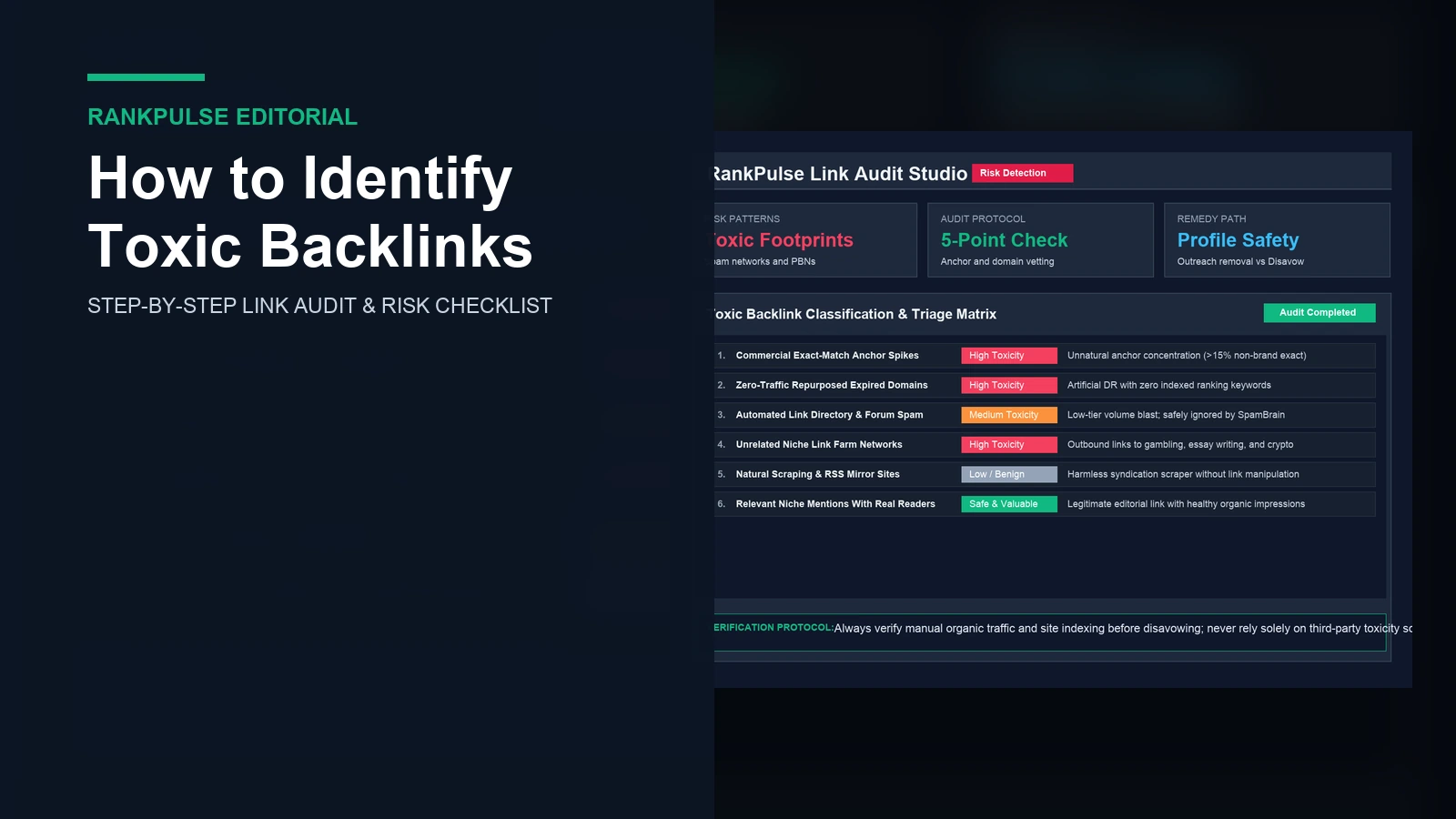
How to identify toxic backlinks before search engines penalize your website? Check search traffic first. You must audit anchor words and test publisher traffic trends. True toxic links occur when shady websites build spam rings to manipulate search ranks.
Many site owners worry about third party tool scores. They panic often. An SEO tool might flag harmless scrapers as toxic. In truth, learning how to identify toxic backlinks requires clear checks. Search engines ignore simple scraper links on their own.
Knowing real link risk protects your search health. Stay vigilant. Review our guide on how to evaluate guest post links to inspect placements before you pay. When you check raw link data by hand, you spot real danger fast. Act early.
What are toxic backlinks and how they harm search visibility
Toxic backlinks are links built purely to game search ranks. These links violate search spam rules on link schemes outlined in the official Google Search spam policies documentation. They often come from automated link farms, paid link brokers, or expired domains turned into private blog networks.
Not every weak link brings harm. Take note. The web contains thousands of small scraper sites and simple feeds. In official Google Search Central documentation, search systems recognize and discount routine scraper pages automatically. You do not need to disavow every low quality mention.
Real danger begins when links show clear intent to cheat search algorithms. Search penalties hit hard. When search engines detect deliberate link manipulation, they apply manual actions to your pages. Our case review on unnatural links manual action recovery explains how manual penalties damage search positions.
How to check toxic backlinks using a 5-step audit
Follow this five-step audit process to check suspect links. Start today.
Step 1: Check commercial exact-match anchor text ratios
Check your anchor text spread first. Natural profiles vary widely. A natural link profile uses brand names, plain web addresses, author names, and simple phrases. When commercial keyword anchors exceed fifteen percent of all links, search engines flag the pattern. Read our guide on anchor text diversity audit to balance your ratios.
Step 2: Review twelve-month organic search traffic trends
Open an SEO tool and look at the publisher traffic trend. Check traffic graphs. A real website shows stable visits or steady growth over twelve months. A sudden drop of sixty percent or more indicates an algorithmic penalty. Reputable blogs keep steady reader traffic across every season.
Step 3: Check site topical relevance and outbound links
Review recent articles on the referring website. Context matters greatly. If a home cooking blog posts articles about payday loans, the link looks artificial. Read twenty recent posts carefully. If the publisher links out to casino, essay, or crypto sites, it is an active link farm.
Step 4: Spot network footprints and shared hosting setups
Private blog networks often share digital footprints. Inspect source code. Look for matching site layouts, identical author photos, shared tracking codes, and duplicate server IP addresses. Placing links across connected networks brings severe penalty risks.
Step 5: Verify indexing status of recent publisher posts
Test whether the referring blog is indexed in search engines. Verify index status. Search for five recent blog titles directly in Google. Spot dead blogs.
If new articles fail to index after fourteen days, search crawlers have de-indexed the website. Our checklist on how to vet guest post sites shows how to test indexing health.
Toxic backlink diagnostic and risk triage matrix
Use this diagnostic matrix to classify suspect links and decide the right step.
| Link pattern | Primary signal | Risk level | Recommended action |
|---|---|---|---|
| Commercial exact anchors | Spikes in target money phrases | High toxicity | Request anchor edit or disavow |
| Repurposed expired domains | Old niche changed to new topic | High toxicity | Disavow entire domain name |
| Private blog networks | Shared server IPs and fake authors | High toxicity | Disavow entire domain name |
| Automated scraper portals | Copied RSS feeds and mirror sites | Low / benign | Ignore; search engines discount |
| Relevant niche forums | Real user discussions with zero DR | Safe & useful | Keep link; brings real referral visits |
Should you remove or disavow toxic backlinks
Once you identify toxic links, pick your remedy based on penalty status. Act with care. If your site receives a manual action in Google Search Console, review the Google manual actions guide and attempt manual removal first. Contact site owners and record every outreach email in a tracking sheet.
When webmasters demand fees to delete links or ignore your emails, use the disavow tool. Protect your site. Check our guide on how to check if a website is penalized by Google to evaluate overall domain health. Never disavow normal low-authority links, as doing so can remove helpful ranking equity.
Frequently asked questions
What makes a backlink genuinely toxic to search rankings?
A backlink turns toxic when it comes from private blog networks, paid link schemes, or automated spam engines that break search rules.
Should you disavow every low quality scraper backlink?
No. Search systems like SpamBrain ignore scraper links without needing manual disavow files.
How does anchor text reveal manipulative link building?
Sudden spikes in exact-match money keywords from weak domains show deliberate link gaming.
Can third-party toxicity scores cause false alarms during an audit?
Yes. Automated tool scores often flag harmless small blogs and web directories as high risk.
Disclosure: RankPulse provides vetted guest post placements. Verify indexing and quality before purchasing links.